



رموز PIN أو الأنماط المرسومة هي بالنهاية إجراءات أمنية حيوية لحماية التطبيقات والبيانات الخاصة بك على جهازك الذكي، ولكن هنالك أوقات يرغب المستخدم بمستوى أكثر تفصيلا وواسع النطاق في هذا الأمر، وهذا بالضبط ما يوفره تطبيق Hexlock لمسخدمي نظام أندرويد.
مع هذا التطبيق لن تحتاج إلى إدخال رمز PIN الخاص بك أو نمط الحماية في كل مرة، حيث لديه القدرة على إقفال التطبيقات التي تريدها في وقت معين وتطبيقات أخرى غير مقفلة، وفي وقت آخر تطبيقات مغايرة تماما عن مجموعة التطبيقات الأولى والتي تم إقفالها وهكذا، أي بوقت العمل هنالك تطبيقات تريد إقفالها يمكنك ذلك مع التطبيق، كذلك في البيت وللحماية الأبوية يمكنك إقفال تطبيقات دون غيرها أيضا، حيث يمكنك التبديل بين هذه المجموعات بكل سهولة.
إمكانية إستخدام تطيبق Hexlock
عند بدء تشغيل التطبيق سيتطلب منك رمز PIN أو نمطا، عليك الإختيار بما يناسبك، وبعد ذلك أدخل PIN الخاص بك أو النمط وتأكيده، وستظهر لك مجموعة التطبيقات المثبتة على جهازك الاندرويد ويمكنك وبكل بساطة تحريك المفتاح بجانب كل تطبيق لإقفاله او فتحه، كذلك يوفر محرك بحث يمكنك الإستفادة منه في البحث عن تطبيق ما لإقفاله، خيار إقفال أو فتح مختلف التطبيقات في آن واحد.
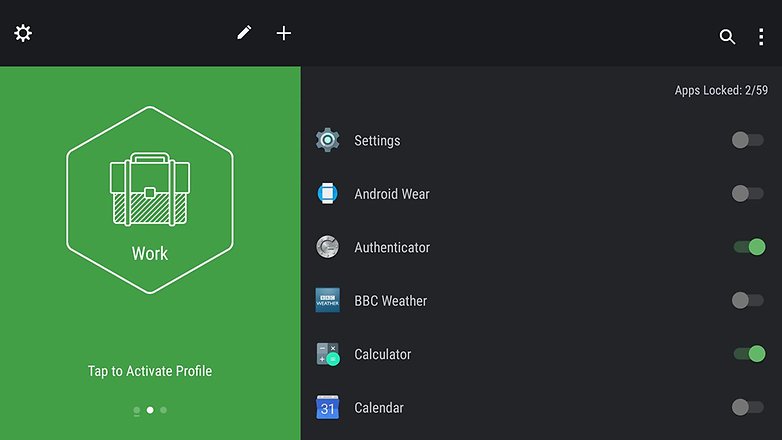
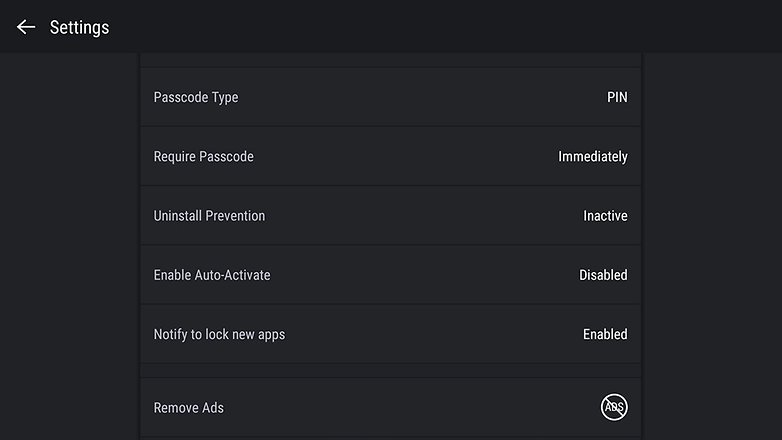
Hexlock يعمل حول فكرة مهمة وأكثر من مطلوبة وهي الشخصية من البيت والعمل والأصدقاء وما إلى ذلك، حيث يمكنك التبديل بين هذه التشكيلات على النحو المطلوب وكل تشكيل يمكنك تحديد التطبيقات المقفلة من التطبيق الغير مقفلة، ورمز الترس أيسر واجهة التطبيق يتيح لك الوصول إلى الإعدادت حيث يمكنك من هنا تغيير النمط أو كود PIN، كذلك منع إلغاء تثبيت التطبيق نفسه.
والآن يمكنك الإستفادة وتجربة التطبيق بتحميله مجانا بالإنتقال لمتجر الاندرويد قوقل بلاي من هنا، وهو يدعم أندرويد 4.0.3 فما يليه من إصدارات ويأتي بحجم 4.0 ميغابايت.
-----------------------------------------------------------------
PIN codes or painted patterns are ultimately vital security measures to protect your applications and data on your smartphone, but there are times the user wants more detailed and wide-ranging level in this matter, and that is exactly what is provided to users of the application Hexlock Android system.
With this application will not need to enter your PIN code or pattern protection at a time, where has the ability to closure of the applications that you want in a particular time and applications other than closed, and in another application as completely different from the first suite of applications, which have been closed and so on, any labor time there applications that you want to close them with the application, as well as in the home and for the protection of parental you can without closing other applications as well, where you can switch between these groups with ease.
The possibility of the use of Ttaibq Hexlock
When you start the application you will need a PIN code or a pattern, you choose what suits you best, and then enter your or pattern PIN and confirmation, and you'll see the installed applications set on your Android and you can simply move the key next to each application for closing or opening it, as well as provide search engine You can take advantage of it in the search for an application to closing, closing or opening different applications at the same option.
Hexlock works on important idea and more than required, a personal home and work and friends and so on, where you can switch between these configurations as required every formation you can specify closed from third parties unlocked app applications, and the symbol of the gear easier and application interface gives you access to settings where you can from here to change the pattern or PIN code, as well as prevent the abolition of the same application installed.
And now you can take advantage and the experience of the application downloaded for free Moving to Android Google Play store from here, it supports Android 4.0.3 versions of what followed comes the size of 4.0 MB.
